Lately I've been using AVHDC (Advanced Video Coding High Definition) .MTS video files on OSX a bit. This video format is not greatly supported on OSX at this point in time. This HD format was developed by SONY and Panasonic and is considered to by a high quality format. My video files are coming from a Panasonic Lumix DMC-TZ10.
Playback
OSX does not currently natively support playback of these files. I recommend installing VLC http://www.videolan.org/vlc/index.html which is both free and has a large enthusiastic usage community.
Conversion
If you want to use these files in iMovie then you have to import them directly from the camera. This can be both slow and reduce the video quality.
If you are not wanting to use iMovie and just want to convert to MPEG-2, DivX, H.264, etc. then you will probably have noticed most search results end up pointing to an expensive piece of conversion software with a heavily crippled trial version.
VLC (see above) does include conversion/export functionality, but its results are a bit unpredictable and is best suited to stream capture.
The best option I have discovered which is fast, reliable and free is Handbrake http://handbrake.fr/ This application is commonly used by some to rip DVD content to a playable file, but it has a great video transcoder at it's core and really does a great job converting .MTS files on OSX for free :)
Monday, 25 June 2012

Wednesday, 23 May 2012
Introducing TheToolbox.cc
I was recently introduced to TheToolbox.cc which is a handy site for web developers. TheToolbox is a collection of best-of-breed tools and helpers for a wide range of jobs: Animation, Bookmarklets, Colors, CSS, Editors, Grids, Icons, Images, Javascript, Lorem Ipsum, Markup, Patterns, Photoshop, Reference, Regular Expressions, Responsive Design, Sprites, Starter Kits, Time & Date, Typography, Unicode, and Web Performance. Definitely worth checking out and bookmarking if you have to deal with those sort of things on a semi-regular basis.

Thursday, 8 September 2011
Syntax Highlighter Chrome Extension: Sight
Last week a colleague introduced me to a handy Chrome Extension called Sight that allows syntax highlighting in your browser and "makes reading code on the browser a joy".
After using it for few days I have to admit that it does make javascript a lot easier on the eye. It has optional line numbers and supports syntax for about 35 different languages.
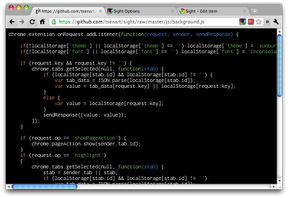
Sadly it doesn't support view-source highlighting, but apparently it's next on the to-do list and is still worth installing in it's current state.
If you're using Chrome you can get the extension from here https://chrome.google.com/webstore/detail/epmaefhielclhlnmjofcdapbeepkmggh
After using it for few days I have to admit that it does make javascript a lot easier on the eye. It has optional line numbers and supports syntax for about 35 different languages.
If you're using Chrome you can get the extension from here https://chrome.google.com/webstore/detail/epmaefhielclhlnmjofcdapbeepkmggh
Friday, 3 June 2011
WordPress Form Helper Functions
Setting the state of checkboxes, radio buttons and selected items in dropdown lists in html forms can become tiresome, so I was pleased to recently discover WordPress has some built-in helper functions. I've found these to be pretty handy in building admin forms for Wordpress plugins and hopefully they can save you some time too.
This function compares two given values (for example, a saved option vs. one chosen in a form) and, if the values are the same, adds the checked attribute to the current radio button or checkbox. This is essentially the same as comparing values with if(), but results in more concise code. The third parameter determines if the result is echoed or just returned which is handy if you are concatenating to a string, etc.
This function has been defined since WordPress v1.0 and is documented here.
This function is for use in dropdown form fields. Compares two given values (for example, a saved option vs. one chosen in a form) and, if the values are the same, adds the selected attribute to the current option tag. Again, the third parameter determines if the result is echoed or just returned which is handy if you are concatenating to a string, etc.
This function has been defined since WordPress v1.0 and is documented here.
This function compares two given values (for example, a saved option vs. one chosen in a form) and, if the values are the same, adds the disabled attribute to a form input field. Again, the third parameter determines if the result is echoed or just returned which is handy if you are concatenating to a string, etc.
This function was not defined until WordPress v3.0 and is documented here.
These functions are all located in
checked( $checked, $current = true, $echo = true )This function compares two given values (for example, a saved option vs. one chosen in a form) and, if the values are the same, adds the checked attribute to the current radio button or checkbox. This is essentially the same as comparing values with if(), but results in more concise code. The third parameter determines if the result is echoed or just returned which is handy if you are concatenating to a string, etc.
This function has been defined since WordPress v1.0 and is documented here.
selected( $selected, $current = true, $echo = true )This function is for use in dropdown form fields. Compares two given values (for example, a saved option vs. one chosen in a form) and, if the values are the same, adds the selected attribute to the current option tag. Again, the third parameter determines if the result is echoed or just returned which is handy if you are concatenating to a string, etc.
This function has been defined since WordPress v1.0 and is documented here.
disabled( $disabled, $current = true, $echo = true )This function compares two given values (for example, a saved option vs. one chosen in a form) and, if the values are the same, adds the disabled attribute to a form input field. Again, the third parameter determines if the result is echoed or just returned which is handy if you are concatenating to a string, etc.
This function was not defined until WordPress v3.0 and is documented here.
These functions are all located in
wp-includes/general-template.php.
Tuesday, 26 April 2011
Using Recycle Files (REX) With Logic Express
This week I made the leap from using Cubase 5 on Win32 to Logic Express on OS X. I don't get as much recording done lately as I would like, so thought I would try Logic Express first before committing to the more expensive Logic Pro.
One of the problems I found was that Logic Express was not recognising my REX files and prompting me to install a REX Shared Library from Propellerheads.se. Searching the Propellerheads site didn't seem to turn up the results until I eventually I spotted this link hidden away in the last column of the footer of the Downloads page.
http://www.propellerheads.se/download/index.cfm?fuseaction=get_article&article=rexsharedlibrary
There are a few versions there so I downloaded this one as it matched my setup
REX Shared Library 1.7 - Universal Binary
For owners of Logic 9.1.2 and later
http://www.propellerheads.se/download/files/Install_Rex_1_7_library.pkg
The install all appeared to work properly but Logic Express was still reporting the same error.
I tried restarting Logic Express, but the error persisted.
I tried restarting my machine, but the error persisted.
I tried reinstalling and carefully read every screen - nothing was wrong there.
I started searching various forums and found there were confusing opinions about the probable cause, most of them quite out of date and that there were multiple possible install paths.
After much reading I found that the files had been installed to /Library/Application Support/Propellerhead Software/REX but the red icon on the folder in Finder told me that I did not have permission to access that folder. It seems that the installer has an issue setting permissions.
I opened a Terminal window, navigated to that folder and entered this command: sudo chmod REX 777 to set the permissions wide open.
After that Logic Express was able to process REX files properly.
One of the problems I found was that Logic Express was not recognising my REX files and prompting me to install a REX Shared Library from Propellerheads.se. Searching the Propellerheads site didn't seem to turn up the results until I eventually I spotted this link hidden away in the last column of the footer of the Downloads page.
http://www.propellerheads.se/download/index.cfm?fuseaction=get_article&article=rexsharedlibrary
There are a few versions there so I downloaded this one as it matched my setup
REX Shared Library 1.7 - Universal Binary
For owners of Logic 9.1.2 and later
http://www.propellerheads.se/download/files/Install_Rex_1_7_library.pkg
The install all appeared to work properly but Logic Express was still reporting the same error.
I tried restarting Logic Express, but the error persisted.
I tried restarting my machine, but the error persisted.
I tried reinstalling and carefully read every screen - nothing was wrong there.
I started searching various forums and found there were confusing opinions about the probable cause, most of them quite out of date and that there were multiple possible install paths.
After much reading I found that the files had been installed to /Library/Application Support/Propellerhead Software/REX but the red icon on the folder in Finder told me that I did not have permission to access that folder. It seems that the installer has an issue setting permissions.
I opened a Terminal window, navigated to that folder and entered this command: sudo chmod REX 777 to set the permissions wide open.
After that Logic Express was able to process REX files properly.
Thursday, 31 March 2011
WordPress Post ID from Permalink
Lately I've been migrating a few websites from Movable Type to WordPress. One of the SEO issues involved with that is supporting the old site's URLs so that existing page rankings don't drop off en masse.
A common Movable Type URL format appends the entry id to the URL which makes it easy to redirect to the correct content IF you have preserved the entry id from MT as the new post id in WP, other times it can be a lot more convoluted.
One of the functions I sometimes need to employ is pretty uncommon, (which is not surprising due it's rare use), so I thought I'd create a quick post here so I can can easily find it next time I need it.
The function is url_to_postid()
This function returns the id for a post or page from a given URL. I like to this of this function as the reverse of the commonly used get_permalink().
It's pretty hard to turn up any useful search results for this function so hopefully this page will help somebody when they need it.
A common Movable Type URL format appends the entry id to the URL which makes it easy to redirect to the correct content IF you have preserved the entry id from MT as the new post id in WP, other times it can be a lot more convoluted.
One of the functions I sometimes need to employ is pretty uncommon, (which is not surprising due it's rare use), so I thought I'd create a quick post here so I can can easily find it next time I need it.
The function is url_to_postid()
This function returns the id for a post or page from a given URL. I like to this of this function as the reverse of the commonly used get_permalink().
It's pretty hard to turn up any useful search results for this function so hopefully this page will help somebody when they need it.
Friday, 24 September 2010
Pro Tip: Check It Yourself
Yesterday I was pushing a module of new code to the blog site of a moderately famous celebrity that is still creaking along on Movable Type (the site, not the celeb). I've not really had to work with Movable Type much before so it was a little bit interesting and I learnt a few bits and pieces.
The code module was working exactly as expected on the development site so I was a bit surprised when it failed on the production site, truncating the rendering of some posts.
Debugging code on a production server is a tricky business (especially when you can't find the error logs), but I tracked it down to this:
The function file_put_contents() was introduced with PHP version 5, so this error indicated the production server was running some version of PHP4. This kind of disparity between production and development environments is certainly not the optimal configuration, but it's not entirely uncommon when working with legacy systems. The problem for me yesterday was that it took me a lot longer to identify and fix the problem because I was sure that the production site was on PHP5...
I'd asked the rest of the development team if the sites I was working on with this module were on PHP5, they were pretty sure they were, but recommended I checked with the ops team. A member of the ops team told me they were all on PHP5 too. I don't know if the error was due to a chat-window miscommunication, lack of familiarity with the site, or just a genuine mistake - it's not really a big deal. In reality, it probably would have been quicker to just check the phpversion() myself when I first thought to ask about it - I would have discovered it was on PHP4 and altered the module's code before I tried to push it to the production environment.
The code module was working exactly as expected on the development site so I was a bit surprised when it failed on the production site, truncating the rendering of some posts.
Debugging code on a production server is a tricky business (especially when you can't find the error logs), but I tracked it down to this:
PHP Fatal error: Call to undefined function: file_put_contents() ...The function file_put_contents() was introduced with PHP version 5, so this error indicated the production server was running some version of PHP4. This kind of disparity between production and development environments is certainly not the optimal configuration, but it's not entirely uncommon when working with legacy systems. The problem for me yesterday was that it took me a lot longer to identify and fix the problem because I was sure that the production site was on PHP5...
I'd asked the rest of the development team if the sites I was working on with this module were on PHP5, they were pretty sure they were, but recommended I checked with the ops team. A member of the ops team told me they were all on PHP5 too. I don't know if the error was due to a chat-window miscommunication, lack of familiarity with the site, or just a genuine mistake - it's not really a big deal. In reality, it probably would have been quicker to just check the phpversion() myself when I first thought to ask about it - I would have discovered it was on PHP4 and altered the module's code before I tried to push it to the production environment.
Subscribe to:
Posts (Atom)